LunchHunt
Tired of Ctrl+F for food?
Let LunchHunt do the searching — so you can do the eating.

👉 Check it out on GitHub
What is LunchHunt?
LunchHunt is a Python-powered menu scout that automatically checks local canteen menus, finds your favorite meals, and sends you Gotify push notifications when they appear.
Now available as:
- Command-line / script mode — for the traditional Python workflow
- Web UI mode — a new dashboard built with Plotly Dash
Documentation
📖 Full docs available on GitLab Pages
Choose your setup
You can now use LunchHunt in two ways:
Option 1 — run LunchHunt from Python
Clone and install
git clone https://github.com/trholy/lunchhunt.git
cd lunchhunt
pip install .
Configure your cravings
Edit example_2.py and list your favorite dishes:
# Example configuration
favorite_foods = ["Eierkuchen", "Milchreis", "Hefeklöße"]
Run a Gotify server
Spin up a local Gotify server for notifications with Docker: Gotify Installation Guide
Run LunchHunt
python example_2.py
You will get a push notification, including where to find it, whenever one of your favorite meals is on the menu.
Option 2 — run LunchHunt with the web UI (recommended)
Docker Compose deployment
services:
  lunchhunt:
    build: .
    container_name: lunchhunt
    ports:
      - "8050:8050"
    environment:
      - TZ=Europe/Berlin
      - PUID=1000
      - PGID=1000
    volumes:
      - ./settings:/home/lunchhunt/app/settings
    restart: unless-stopped

  gotify:
    image: gotify/server
    container_name: gotify
    ports:
      - 8080:80
    environment:
      - GOTIFY_DEFAULTUSER_PASS=admin
      - GOTIFY_DEFAULTUSER_NAME=admin
      - TZ=Europe/Berlin
    volumes:
      - "./data:/app/data"
Then run:
docker compose up --build -d
Access the UI at http://localhost:8050
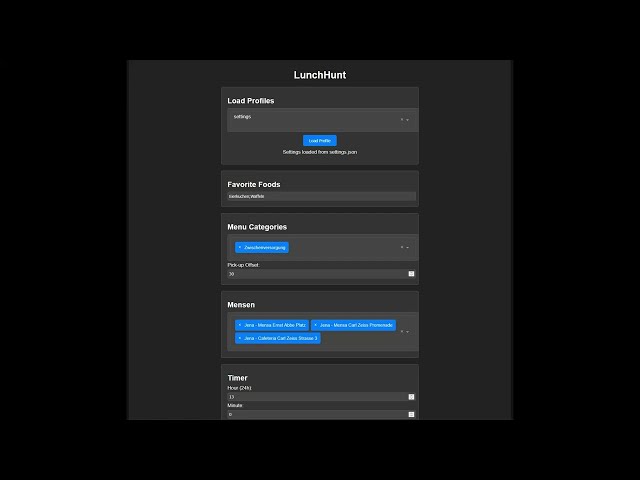
The LunchHunt web UI
Purpose
LunchHuntApp is a web-based configuration interface, built with Plotly Dash, that lets you:
- Configure food preferences and canteens
- Schedule daily notification jobs
- Manage multiple profiles
- Send notifications through Gotify
- Create and delete cron jobs visually
What it saves you
- The menus of the configured canteens are checked automatically on a schedule.
- A notification is sent only when one of your configured dishes appears, including the canteen it appears in.
Project structure
lunchhunt
├── .dockerignore
├── .gitignore
├── .gitlab-ci.yml
├── Dockerfile
├── LICENSE
├── README.md
├── THIRD_PARTY_LICENSES.txt
├── assets
│   └── style.css
├── data
│   └── .gitkeep
├── docker-compose.yml
├── docker-entrypoint.sh
├── documentation
│   ├── examples
│   │   ├── example_1.md
│   │   └── example_2.md
│   ├── notify
│   │   └── notifier.md
│   ├── scrap
│   │   └── scraper.md
│   ├── utils
│   │   └── util_functions.md
│   └── web
│       └── webUI.md
├── example_usage
│   ├── example_1.py
│   └── example_2.py
├── img
│   └── scroll_meme.png
├── mkdocs.yml
├── pyproject.toml
├── run.py
├── settings
│   └── settings.json
├── setup.py
└── src
    └── lunchhunt
        ├── __init__.py
        ├── notify
        │   ├── __init__.py
        │   └── notifier.py
        ├── scrap
        │   ├── __init__.py
        │   └── scraper.py
        ├── utils
        │   ├── __init__.py
        │   └── util_functions.py
        └── web
            ├── __init__.py
            └── webUI.py
Contributing
Contributions are welcome.
License
This project is released under the MIT License.